EEG data preprocessing
Following data acquisition, you have obtained raw EEG data. Before you can analyse it, you need to clean it up and prepare it for analysis. This process is called preprocessing. On this page we will desmonstrate a lightweight workflow that you can adopt to preprocess your data. The input to this workflow is raw .bdf eeg data files, and the output is .fif epoch files.
We will use the mne-python library to demonstrate in code how to run each step, but the logic can be replicated using other standard libraries.
In this demo, the EEG data format is one single file, covering the whole EEG session. We will use the parameters included below (a good practice idea is to keep a separate file with all preprocessing parameters listed):
{
    "ica_band_pass_filter": [1.0, 30.0],
    "band_pass_filter": [0.1, 30.0],
    "powerline_frequency": 50,
    "downsample_rate": 250,
    "filtering_recording_margin": 5.0,
    "auto_ICA": false,
    "epoching_time_window": [-0.2, 1.2],
    "anode_references": ["D7"],
    "cathode_references": ["C7"]
}
Overview of the preprocessing steps
The preprocessing pipeline takes raw EEG data and transforms it into clean, usable data for analysis. Here are the main steps:
- Load your data
- Make main & ICA copies, apply band pass filtering
- Filtering out the power line frequency
- Interpolate bad channels & resample
- Perform ICA
- Re-reference the EEG signal
- Epoch, add metadata and apply baseline correction
Requirements
To start preprocessing your data, you should have the following ingredients:
- Your raw EEG data (files in
.bdfformat if you collected data with our BioSemi system), correctly placed in thesourcedatafolder of your BIDS directory. - Optional but recommended: your epoch metadata files. These should be simple data tables containing any relevant per-trial information you might need later to run your analyses (for instance data about key presses, accuracy, or stimulus file name). See the mne documentation for more.
- Optional: your events in external
.fiffiles. Events can be extracte directly from the raw EEG data. You could have them as external files in case you need to fix them in any way (for instance, to correct for the trigger-photodiode delay). See the mne documentation for more on this. - A per-subject list of bad channels. Before doing any preprocessing, have a look at your data and identify any bad channels that shouldn't be included in the analyses. Keep track of them in an external file for consistency.
1. Load your data
Your first need to load your data, attach bad channels information to it, and load the correct EEG system montage information. At the same time, we select out only the EEG channels (removing extra channels in the data).
# Load the data
eeg_data = mne.io.read_raw_bdf('my_file.bdf')
eeg_data.pick_channels(eeg_channels) # eeg_channels = ['A1', 'A2', ...]
# Load the BioSemi montage & set it to the data
montage = mne.channels.make_standard_montage('biosemi128')
eeg_data.set_montage(montage)
# Load the bad channels & add them to the metadata
bad_channels = json.load(open('my_badchannels.json'))
eeg_data.info['bads'] = bad_channels
raw_eeg.pick_channels(eeg_channels)
2. Make copies & band pass filter
We start by making 2 copies of our data. There is a main copy, which we will use to create the actual events, and an ICA copy, on which we will run the ICA. We separate these two as the optimal filtering parameters differ between them.
In order to filter, make sure you have enough empty data surrounding your actual EEG data. Filtering affects the edges of continuous data disproportionately, so starting the recording a bit before and ending a bit after the task ensures we don't distort actual useful data when filtering. This is what the filtering_recording_margin parameter is for. You can check that you have enough slack around your actual data with this kind of check:
# Read in the events
events = mne.read_events('my_events.fif')
# Define the triggers that correspond to actual data, e.g. stimuli
stimulus_triggers = [4, 5, 6] # good practice is to have an external file with these
# Find the first and last samples where an stimulus event happened
first_sample = events[np.where(np.isin(events[:, 2], stimulus_triggers))[0][0], 0]
last_sample = events[np.where(np.isin(events[:, 2], stimulus_triggers))[0][-1], 0]
# Find the time (in seconds) when the first and last stimulus events happened
time_to_first_stimulus = (first_sample - eeg_data.first_samp) / eeg_data.info['sfreq']
time_after_last_stimulus = (eeg_data.last_samp - last_sample) / eeg_data.info['sfreq']
# Make sure those were at a decent margin away from the edges of your data
assert time_after_last_stimulus <= filtering_recording_margin, "Not good"
assert time_to_first_stimulus <= filtering_recording_margin, "Not good either"
If that check passes, then you're ready to filter your data.
# Apply filtering
iir_params = dict(order=2, ftype='butter') # 2nd-order → 12 dB/octave
main_copy.filter(
    l_freq = main_fmin,
    h_freq = main_fmax,
    method = 'iir',
    iir_params = iir_params,
    phase = 'zero'
)
ica_copy.filter(
    l_freq = ica_fmin,
    h_freq = ica_fmax,
    method = 'iir',
    iir_params = iir_params,
    phase = 'zero'
)
3. Filter out power line frequency
We now need to filter out the specific frequency at which the power line runs, as it can create noise in the data. That is of course not needed if, as in this example, the power line frequency is already filtered out through band pass filtering. If your parameters don't exclude this frequency, filter it out using a notch filter:
main_copy.notch_filter(freqs=power_line_noise_freq)
ica_copy.notch_filter(freqs=power_line_noise_freq)
4. Interpolate bad channels & resample
We now remove the bad channels and interpolate their data using the interpolate_bads function. At the same time, we resample our data. The original EEG is recorded at ~2048 Hz, we downsample to a lower frequency (e.g., 250 Hz) to speed up analysis while keeping all the important information.
main_copy.interpolate_bads(reset_bads=True).resample(sfreq=downsample_freq)
ica_copy.interpolate_bads(reset_bads=True).resample(sfreq=downsample_freq)
5. Perform ICA
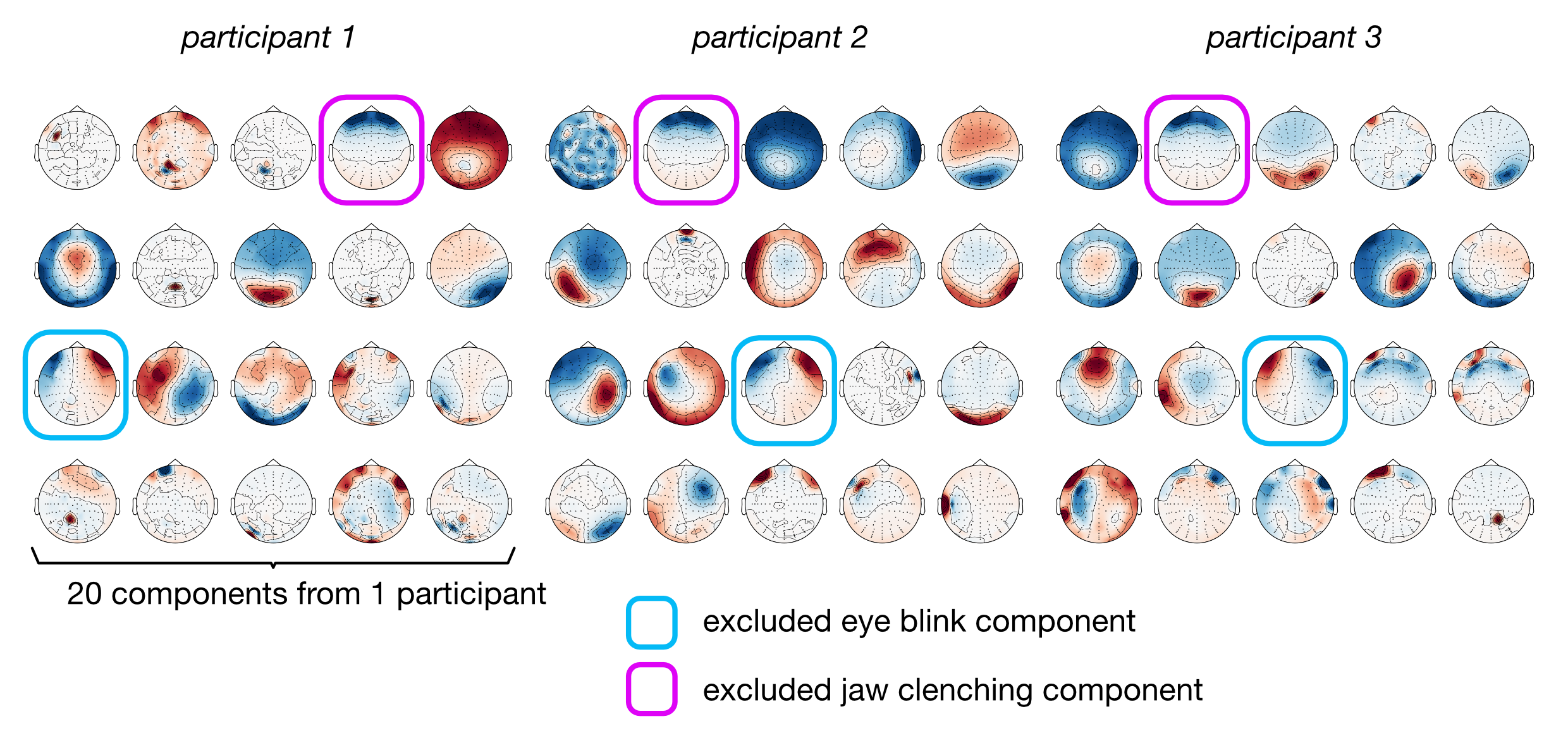
ICA (Independent Component Analysis) is a statistical method that separates EEG signals into independent components. Some components are neural activity (what we want), and some are artifacts like eye blinks or jaw clenching (what we don't want). Performing the ICA means extracting those components. We then choose which components to exclude to clear out artifacts.
# Create an ICA instance
ica = mne.preprocessing.ICA(n_components=20, random_state=random_number) # choose a number for reproducibility
# Fit the ICA onto the ICA copy of the data
ica.fit(ica_copy)
Following the fitting of the ICA, we want to know which components to exclude. This can be determined automatically, or manually. The automatic way uses tools that will look for signatures of jaw clenching and eye blinking. The manual way consists in looking at the topography of the components and selecting those that resemble the most what we are after.
The automatic way can be something like this:
# Add an artificial bipolar reference to the ICA copy to serve as an eye blink detector
ica_copy = mne.set_bipolar_reference(
    ica_copy,
    anode=anode_references,
    cathode=cathode_references,
    ch_name='vEOG',
    drop_refs=False
)
# Find EOG-related components
eog_indices, eog_scores = ica.find_bads_eog(ica_copy, ch_name='vEOG')
ica.exclude = eog_indices # add the indices of the detected EOG components
To go the manual way, the approach is to plot all components and make an informed selection. Here is one could go about this:
# Plot the ICA component topography and ask the user to input which are the bad ones
fig = ica.plot_components(show=True)
eog_indices = input(f'Indices of the ICs to exclude for {sub} (comma-separated, e.g. 1,9): ')
# Add the selected indices to the exclusion list
ica.exclude = [int(idx) for idx in eog_indices.split(',')]
Once the components have been selected and added to the exclusion list, apply the exclusion onto the main copy. At this point the ICA copy has done its job and is not used anymore.
Below are some examples of plotted ICA topographies. You can spot the bad components linked to eye blink and jaw clenching by visual inspection.
6. Re-reference the EEG signal
EEG signals are always measured as the difference between an electrode and a reference point. In re-referencing, use an average reference, which means we subtract the average of all channels from each channel. This is a standard approach that gives every electrode equal weight. We apply this by using the set_eeg_reference function.
7. Epoch, add metadata and apply baseline correction
After preprocessing, the data is still one long continuous recording. We epoch it by cutting it into smaller chunks, each aligned to a specific event in your experiment. This is why your events are crucial: include in them any variable onto which you will want to run analyses (most likely your stimuli, but maybe also key presses and more).
To epoch, we need to input a tmin and tmax parameter, which will determine our time window of interest around the events we analyse. These values will depend on your design: if your inter-stimulus interval is 500ms, it's not useful to keep data later than 500ms after stimulus onset for each epoch. Longer time windows will mean more data, and hence longer analysis time, so choose wisely.
We can also provide an event_id parameter. A good practice here is to use an external file in which we keep our trigger mappings, probably the same file that is fed into your EEG behavioural task script. If you have a .json file with the appropriate structure (see below), you can just pass it to Epochs, which will find the corresponding triggers in your data and keep track of the labels you gave them.
When we epoch our data, we apply a baseline correction, which means we subtract the average electrical activity in a baseline period (typically just before the event) from each epoch. This removes any slow electrical drift and makes it easier to see the neural response to the experimental event.
# Create the epochs out of the preprocessed data
epochs = mne.Epochs(
    main_copy,
    events,
    tmin=epoch_tmin,
    tmax=epoch_tmax,
    event_id=trigger_mapping, # the loaded trigger mapping json file
    preload=True,
    baseline=(-0.2, 0), # choose the appropriate baseline period
    reject=None,
    reject_by_annotation=False,
    proj=False
)
# Add your metadata to the epochs, to be able to access it later in your analyses
epoch_metadata = pd.read_table('my_metadata.tsv')
band_epochs.metadata = epoch_metadata
You're done. All you have left to do is to save the results (choose an appropriate BIDS-compatible naming & folder structure).